Most people who say they "know SIEM" have clicked through a managed tool someone else configured. I wanted to understand what happens underneath — how events actually move from a compromised machine to an alert, how detection rules are tuned, and what the full attack-detect-respond loop looks like when you're the one running all three sides of it.
So I built a dedicated lab. Isolated VLAN, intentionally vulnerable target, Kali Linux attacker, and a live Wazuh SIEM server watching everything. This is the writeup of what I built, how it works, and what I'm doing with it.
Architecture
The whole lab lives on a dedicated Lab VLAN 30 (10.0.30.x), isolated from my main LAN and IoT network by UniFi firewall rules. The machines on it can reach the internet for updates but cannot touch any other VLAN — except for one deliberate exception I'll explain below.
| Machine | Role | OS | IP |
|---|---|---|---|
| X1 Carbon (host) | Wazuh SIEM Server | Ubuntu Server 24.04 | 10.0.30.10 (static) |
| Kali VM | Attacker + monitored node | Kali Linux | 10.0.30.x (DHCP) |
| Metasploitable 3 VM | Attack target | Ubuntu 14.04 | 10.0.30.8 (static) |
| Raspberry Pi 4 | Monitored endpoint | Raspberry Pi OS | 10.0.30.x (DHCP) |
The X1 Carbon runs Wazuh all-in-one — Manager, Indexer, and Dashboard on a single Ubuntu host. VirtualBox runs the Kali and Metasploitable VMs on top of it. Both VMs have Wazuh agents installed so I can see what's happening on the attacker machine too, not just the target.
The deliberate hole in the wall
Lab VLAN is locked down from everything — but I punched one controlled opening: Wazuh agents on Lab machines ship logs back to the SIEM server. Just logs. Nothing else.
This is the thing that makes it a real detection environment rather than just a sandbox. Full isolation would contain an attack but leave me blind to it. Allowing only log traffic out gives me the best of both worlds: the vulnerable machines can't touch anything valuable, but I see every attack event, every rule trigger, every lateral movement attempt — in real time, the way a SOC analyst would.
The firewall rule that makes this work took more than one try. In UniFi Network 10.37.x, Accept rules always appear below Drop rules in the same policy table — you can't reorder them. The fix was to modify the Drop rule itself to exclude specific IP ranges rather than trying to add an Accept override above it. One Drop rule, multiple destination ranges, and the log traffic finds its path.
What's running right now
Things that broke (and how I fixed them)
A setup guide that only shows the happy path isn't useful. Here are the three problems that took real time to solve.
ProtonVPN intercepting lab traffic. VPN on the Mac creates a utun4 interface at 10.2.0.x that absorbs all 10.x.x.x traffic, including the Lab VLAN. SSH to the X1 Carbon timed out even though routing was otherwise correct. Fix: a static route on the Mac to bypass the VPN for Lab traffic specifically — one command, doesn't affect anything else.
Boot hang on the X1 Carbon. After every reboot, the server stalled at boot and required a physical console login before SSH would respond. Root cause: systemd-networkd-wait-online timing out on the unused ethernet port while NetworkManager handled WiFi. Fix: disable and mask the service. SSH comes up clean on every reboot now.
Wazuh agent version mismatch. Kali's apt repo installed the latest Wazuh agent (4.14.7) but the manager was 4.9.2. The agent registered but immediately errored: "version must be lower or equal to manager." Fix: pin the agent install to the exact manager version and set the manager IP in the config. This applies to every agent added going forward.
Attack Cycle 1: ProFTPD RCE to Root
The first full attack cycle ran on September 15, 2026. Starting from nothing on Kali (10.0.30.81), the goal was to reach root on Metasploitable 3 (10.0.30.8) while Wazuh watched.
Phase 1 — Recon. An nmap -sV -sC -O -T4 scan against the target returned 8 open ports: FTP (21), SSH (22), HTTP (80), Samba (445), CUPS (631), MySQL (3306), and two HTTP services on 8080/8181. Service version fingerprinting exposed the full stack — ProFTPD 1.3.5, Apache 2.4.7, OpenSSH 6.6.1, Samba 4.3.11. Wazuh generated recon alerts as the scan progressed.
Phase 2 — Initial access via CVE-2015-3306. ProFTPD 1.3.5 ships with a vulnerable mod_copy module that allows unauthenticated file copy via SITE CPFR/CPTO FTP commands. The Metasploit module exploit/unix/ftp/proftpd_modcopy_exec used this to write a PHP web shell to /var/www/html, then triggered it via HTTP to get a reverse shell. Result: command shell as www-data, no credentials required.
Phase 3 — Privilege escalation. With a shell as www-data, lateral movement to the vagrant account was possible using the Vagrant project's published insecure SSH private key — the default keypair shipped with every Vagrant box that was never rotated on this image. SSH required a legacy algorithm flag (PubkeyAcceptedKeyTypes=+ssh-rsa) due to the old OpenSSH version. The vagrant user has unrestricted passwordless sudo, so sudo su gave root immediately.
| Phase | Technique | Tool | Result |
|---|---|---|---|
| Recon | Service version scan | nmap -sV -sC | 8 open ports enumerated |
| Initial Access | CVE-2015-3306 ProFTPD mod_copy | Metasploit | Shell as www-data |
| Privilege Escalation | Vagrant insecure SSH key + sudo | SSH + sudo su | Root shell |
What Wazuh caught: 1,469 total events generated across the session. 1,455 authentication failures from the hydra brute-force attempt. The FTP exploit triggered ProFTPD session alerts (rule 11201) and a new listening port event (rule 533) when the reverse shell opened. The privilege escalation fired rule 5402 (successful sudo to ROOT) and rule 5305 (first-time su execution) within the same second. MITRE ATT&CK techniques mapped automatically: Password Guessing, Brute Force, Valid Accounts, Remote Services, Sudo and Sudo Caching. Every phase of the kill chain produced a distinct, correlated signature.
Extending to Production: TrueNAS Agent
Lab VMs are useful for controlled attack scenarios, but they only tell half the story. I also wanted Wazuh watching a system with real stakes attached — my self-hosted media and file server, which my household depends on daily. If it goes down, it's not just a lab exercise.
The challenge: TrueNAS SCALE has a read-only root filesystem. Running apt install works, but the install gets wiped on every system update. The solution was to run the Wazuh agent as a Docker container via the existing Dockge stack manager — persistent storage on the data pool, managed alongside every other service on the box.
There's no official standalone Wazuh agent image on Docker Hub, so I built one from a debian:12-slim base, pinned to the exact manager version (4.9.2), with host network mode and privileged: true so Wazuh can see through the container into the actual TrueNAS system. The host's /var/log and /etc are mounted read-only into the container.
A firewall exception was required — TrueNAS lives on the main LAN while the Wazuh manager is on the isolated Lab VLAN. The connection is one-way outbound only: the agent ships logs to the manager on port 1514 TCP. Nothing on the lab network can reach back.
Lesson learned — the tee heredoc pattern. Creating files over SSH with nano led to a paste error that put the wrong content in both files, causing the container to fail on build. The fix was using sudo tee /path/to/file << 'EOF' ... EOF — content and destination in one atomic command, no clipboard mix-ups, no CRLF line ending issues. Small thing, but it's the kind of operational habit that matters in a real environment.
Within minutes of the agent connecting, Wazuh ran an automatic CIS Debian Family Linux Benchmark compliance scan — 52 checks passed, 42 failed, 55% overall. It also began mapping events to MITRE ATT&CK tactics automatically: Defense Evasion, Initial Access, Persistence, Privilege Escalation, and Lateral Movement all appeared from normal system activity alone. Every SSH login generates correlated PAM session events. Every sudo command is tracked.
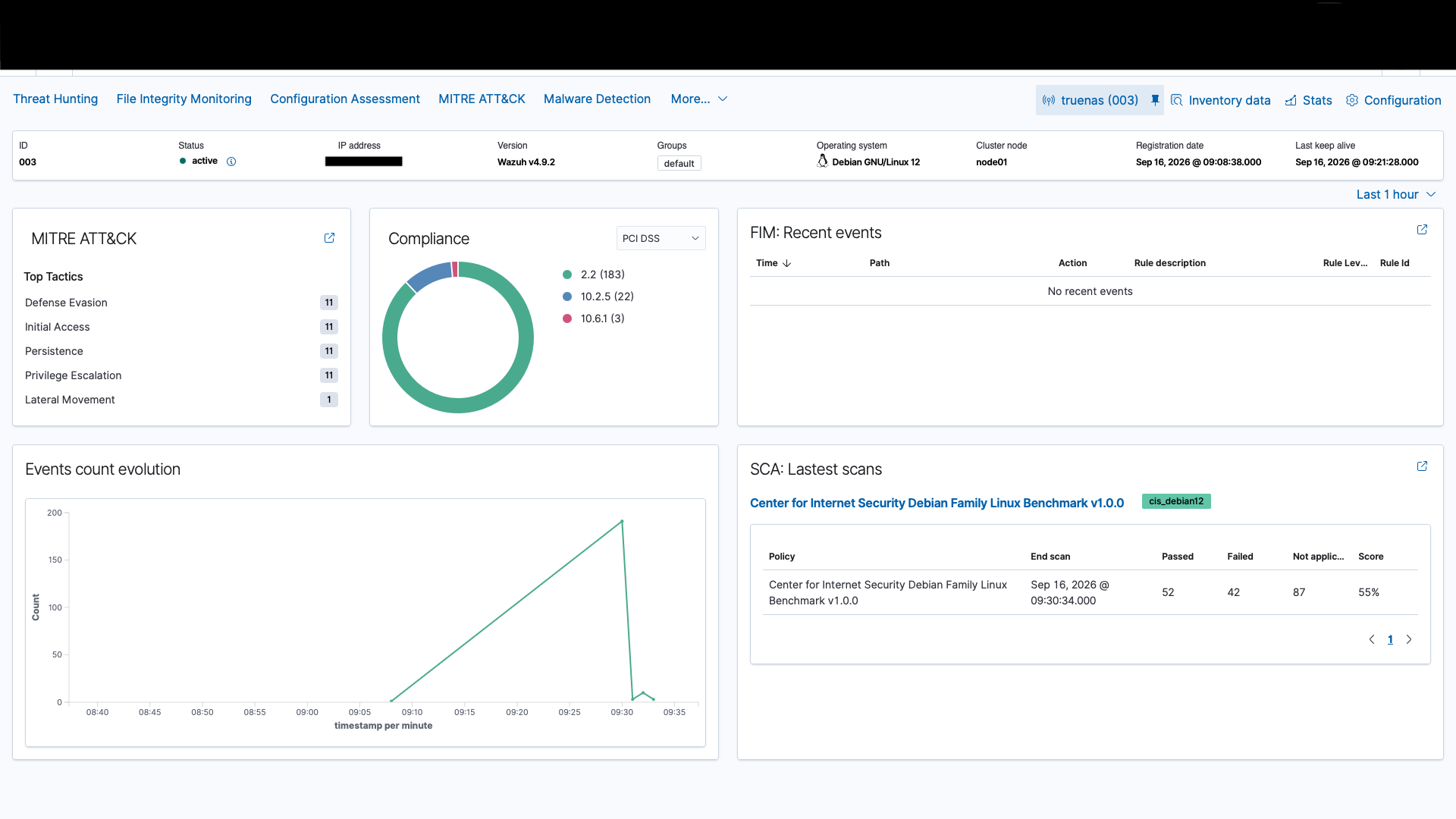
TrueNAS agent overview — MITRE ATT&CK auto-mapping and CIS Debian benchmark compliance scan running automatically on connect.
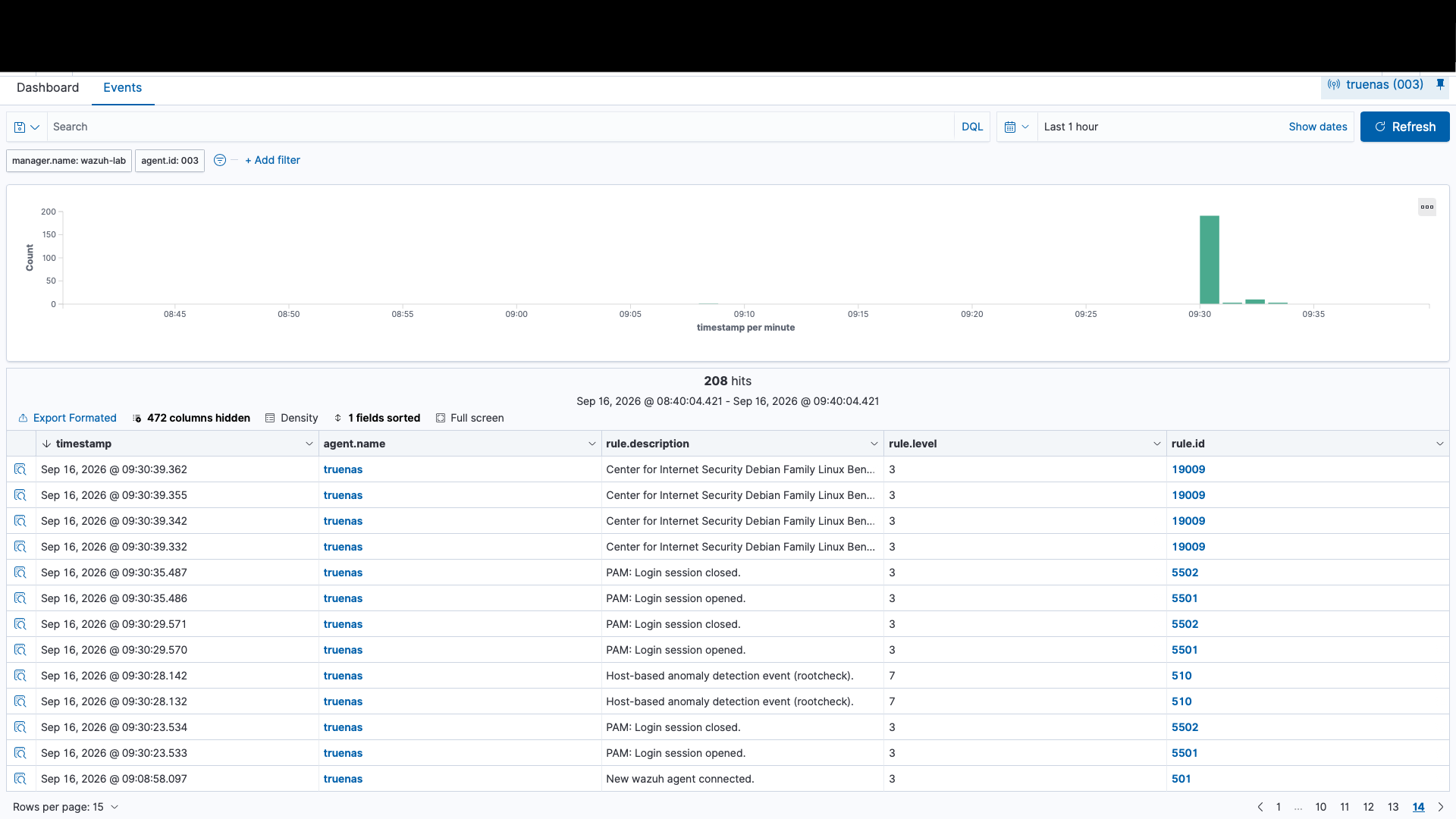
208 real-world events in the first hour — SSH authentication, PAM session lifecycle, host-based anomaly detection, and CIS compliance findings.
What comes next
The first attack cycle is documented. Next phases:
SQL injection on the payroll app — the payroll_app.php endpoint exposed by nmap is likely injectable. This is a different attack surface — web app layer — with different detection signatures in Wazuh.
Custom detection rules — write my own Wazuh rules for behaviors the defaults don't catch. This is the part that translates most directly to real SOC work: understanding what your detection coverage actually is, and filling the gaps.
DVWA via Docker — add a dedicated web application target for broader web attack scenarios (XSS, brute force, file inclusion). Different attack surface, richer detection data.
Download the portfolio document
The full PDF writeup covers architecture diagrams, the complete attack scenario table, Wazuh configuration details, detection findings, and skills demonstrated — formatted for job applications and technical reviewers.
Download PDF Get in touch