Right now, on most home networks, every device can talk to every other device. Your smart TV, your kid's tablet, that $30 Wi-Fi plug you forgot you installed, and the NAS holding your family photos and tax documents are all sitting in the same room with the doors open.
That's fine until one of those cheap devices gets compromised — and cheap devices get compromised constantly, because nobody patches a smart plug. Once an attacker has a foothold on any device on a flat network, they can reach everything on it. The plug becomes a door into the drive with your whole life on it.
The fix is a concept called network segmentation, and it's one of those things that sounds like enterprise IT wizardry but is genuinely understandable in about five minutes. Here's how it actually works, and how I've set it up in my own homelab.
Segmentation is just separate rooms with locked doors
Think of a flat network as a studio apartment: one big open space where everything can see everything. Segmentation turns it into a house with separate rooms and locked doors between them. Your guests hang out in the living room; they don't wander into your bedroom or your safe.
The mechanism that does this is a VLAN — a Virtual Local Area Network. The "virtual" part is the clever bit: you don't need separate cables or separate hardware. One physical network gets sliced into several isolated logical networks, and devices on one VLAN can't see devices on another unless you explicitly allow it. Same wires, separate rooms.
By default, the doors between rooms are locked. You decide which specific ones open, and in which direction. That last detail — directional, selective doors — is the whole game, and it's where segmentation stops being "walls" and starts being actual security design.
My four-VLAN layout
Here's the structure I use. Four zones, each with a clear job:
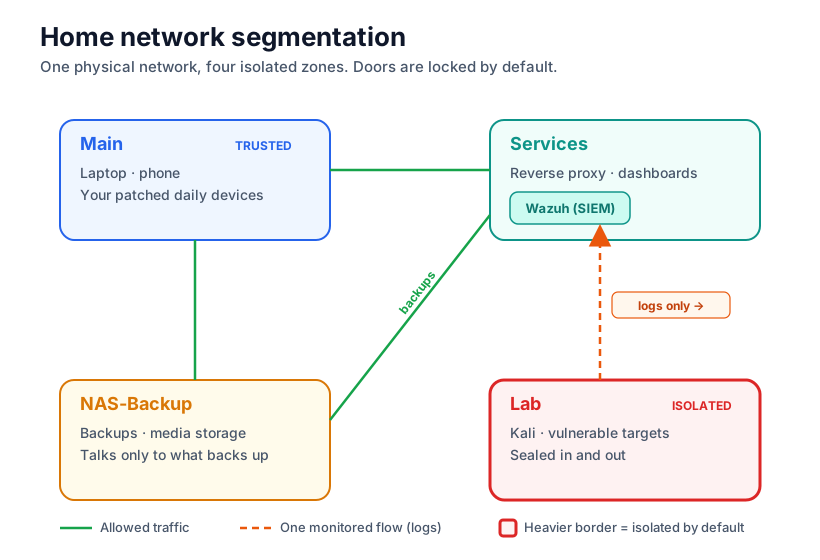
// four zones · green = allowed · orange dashed = monitored logs only · heavy border = isolated
Main is the trusted zone — the daily-driver laptop and phone, the devices I actually control and keep patched.
Services holds the self-hosted apps — the reverse proxy, dashboards, automation, the SIEM. These need to be reachable from Main but shouldn't be exposed to anything sketchy.
Lab is the interesting one. This is where I run deliberately vulnerable machines to practice attacks against — a Kali box, an intentionally broken target. That is exactly the kind of thing you never want loose on your real network, so it lives behind the hardest walls of the four: nothing gets in, and it can't reach anything out.
NAS-Backup is storage — the drives holding backups and media. It talks to the machines that legitimately need to back up to it, and nothing else.
The one detail that makes it real security
Here's the part most tutorials skip.
The Lab VLAN is walled off from everything — except I allow one specific outbound flow: log shipping to my SIEM (Wazuh) over in the Services VLAN. Just the logs. Nothing else.
Why deliberately poke a hole in a wall I just built? Because isolation alone is only half of security. If I completely blackholed the Lab, I could contain an attack but I'd be blind to it. By allowing only the logs out, I get the best of both: the vulnerable machines can't touch anything valuable, but I can still watch every attack land, generate alerts, and practice the full detect-and-respond loop.
That's the difference between "I put my scary stuff in a box" and "I built an environment where I can safely watch attacks happen and learn to catch them." Isolate, but observe. Once you're thinking in those terms, you're thinking like a defender, not just a hobbyist.
Get the full build
Everything above is the why and the shape of the design — enough to plan your own segmentation from scratch. The exactly how is in the repo: the specific UniFi VLAN settings, the full firewall rule set with the inter-VLAN policy matrix, the Wazuh log-shipping exception configured correctly, and a troubleshooting section on the things that actually broke for me (mDNS and casting across VLANs is the classic headache).
View on GitHub Get in touch